A4 vs Letter Paper Size – The Difference Explained Simply (Which One Should You Use?)
You designed a document on your laptop, sent it to a colleague in another country, and it printed with the text cut off at the bottom. Or the other way – you got a document formatted for US Letter and printing it on A4 left an ugly gap at the bottom.
This is one of those frustrating problems that nobody warns you about until it happens. A4 and US Letter are so similar in size that they look almost identical. But they are not the same – and the difference is enough to mess up margins, page counts, and formatting when you switch between them.
This guide explains the exact A4 vs Letter paper difference, the practical consequences, and exactly when each one applies so you never have a printing problem from this again.
The Exact Measurements – Side by Side
| Measurement | A4 Paper | US Letter Paper |
|---|---|---|
| Width | 210 mm / 21.0 cm / 8.27 inches | 216 mm / 21.6 cm / 8.50 inches |
| Height | 297 mm / 29.7 cm / 11.69 inches | 279 mm / 27.9 cm / 11.00 inches |
| Area | 623.7 cm² | 603.2 cm² |
| Standard region | Pakistan, India, UK, Europe, most of the world | USA, Canada, Mexico, Philippines |
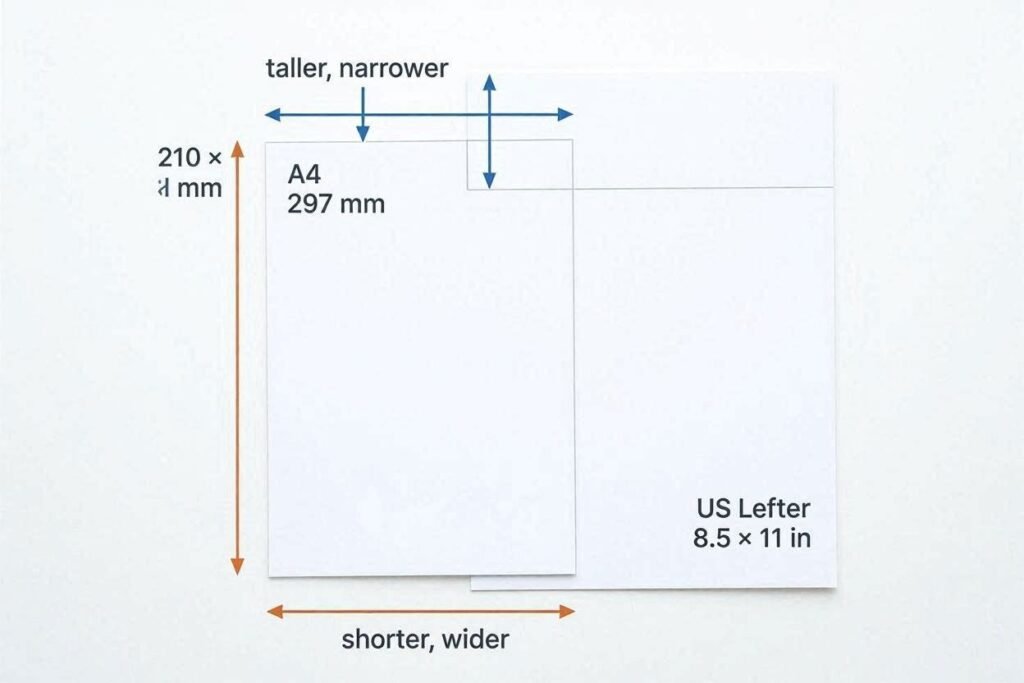
The key differences: A4 is slightly narrower but noticeably taller. US Letter is slightly wider but shorter. If you place them on top of each other, A4 sticks out at the bottom and Letter sticks out at the right side.
You can see all paper sizes and their exact dimensions at the Paper Size Guide at onlineruler.online – it includes A3, A5, B4, B5, Legal, and more.
Where Does Each Format Come From?
A4 comes from the ISO 216 standard, which is based on a mathematical principle: each A-series sheet is exactly half of the previous one when folded along its long side. A0 is the starting size (1 square meter). Folding it once gives A1, again gives A2, again gives A3, and again gives A4. This means every A-series size has the same aspect ratio – the width-to-height proportion is always 1:√2 (approximately 1:1.414).
US Letter comes from a different historical tradition – paper manufacturing standards in the United States that predate the metric system. The American National Standards Institute (ANSI) formalized it. Unlike the ISO system, US paper sizes do not share a consistent aspect ratio.
This is why documents designed for A4 never look quite right on Letter, and vice versa – the aspect ratios are different.
The Practical Consequences – What Actually Goes Wrong
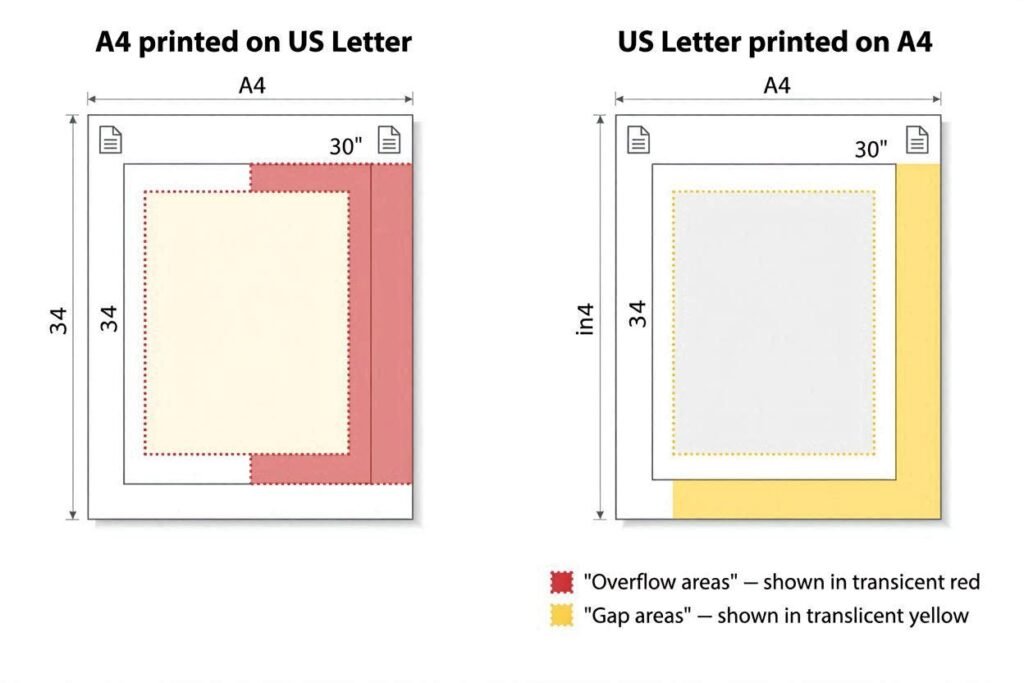
When you print an A4 document on Letter paper:
- The content is slightly cut off on the right (A4 is wider than Letter has room for)
- There is a gap at the bottom (Letter is shorter than A4’s content area)
- If auto-scaling is on, text and images shrink slightly to fit, changing font size and layout
When you print a Letter document on A4 paper:
- There is a gap on the right (Letter is wider than A4 allows)
- Content may overflow at the bottom (Letter is taller than A4 – wait, no: A4 is taller, so Letter content actually fits in height)
- With auto-scaling, everything shrinks slightly to fit A4’s narrower width
In practice, the differences are small enough that for basic text documents, it usually prints acceptably. But for anything with exact margins, headers, footers, or graphics that extend to the edge – the size difference causes visible problems.
How to Avoid Paper Size Problems
If You Are Creating a Document
- Set your document’s page size in your word processor before you start writing, not after
- If you are in Pakistan, India, UK, or Europe: use A4 as your default
- If you are sharing documents with US colleagues who will print them: ask which size they need, or create in both formats
- For documents shared primarily as PDFs that will be read on screen: page size matters less – the reader software handles the display
If You Have a Formatting Problem Now
- In Microsoft Word: go to Layout → Size → and select the correct page size. Word will reflow the content
- In Google Docs: go to File → Page setup → Paper size
- In LibreOffice Writer: Format → Page Style → Page tab → Paper format
- For PDFs: use your PDF software’s print settings to select ‘Fit to page’ when printing to the wrong paper size
Other Common Paper Sizes to Know
| Paper Name | Width x Height | Common Use |
|---|---|---|
| A3 | 297 x 420 mm | Posters, large engineering drawings, newspapers |
| A4 | 210 x 297 mm | Standard documents, letters, reports (most of world) |
| A5 | 148 x 210 mm | Small notebooks, flyers, booklets |
| A6 | 105 x 148 mm | Postcards, pocket notebooks |
| US Letter | 216 x 279 mm | Standard documents, letters (USA, Canada) |
| US Legal | 216 x 356 mm | Legal contracts, court documents (USA) |
| US Tabloid | 279 x 432 mm | Newspapers, large spreadsheets |
For exact dimensions of any paper size, use the Paper Size Guide at onlineruler.online/paper-size-converter/. And if you need to convert measurements between CM, MM, and inches for any paper size, the Unit Converter handles it instantly.
Frequently Asked Questions
Usually yes, with a small caveat. Most modern printers auto-scale the content to fit. For pure text documents with standard margins, the result is barely noticeable. For documents with borderless images, exact-margin layouts, or edge-to-edge content, you may see cropping or gaps.
Yes. Printers sold in Pakistan, India, and most of Europe come configured for A4 by default since that is the regional standard. You can usually change the paper size in the printer settings, but A4 is the correct default for your region.
Neither is simply bigger – they are different shapes. A4 is taller and narrower. US Letter is shorter and wider. A4 has slightly more total surface area (624 cm² vs 603 cm²).
PDFs do embed a page size setting, so a PDF created in A4 will show as A4 when opened. However, viewing a PDF on screen is not affected – it scales to your window. The paper size only matters when printing.
Need to measure your physical paper to confirm its size? Use the main the main Online Ruler at onlineruler.online – calibrate it to your screen with a credit card and measure the paper directly on screen.